NFZ public healthcare (Poland)


Public Healthcare bookings support is currently limited only to Poland, activation needs to be coordinated with Docplanner team.

Guide explains practical implementation details on how to feed the doctor profile with NFZ-related attributes (insurances, slots).
Public healthcare bookings in Poland are funded by NFZ (Narodowy Fundusz Zdrowia) and are increasingly expected by patients searching for a doctor on znanylekarz.pl. This guide walks integrators through the small set of API additions required to expose NFZ availability alongside private slots without restructuring an existing integration.
Context
NFZ (Narodowy Fundusz Zdrowia) is the public healthcare provider in Poland. It is exposed through the existing Insurances, Slots, and Bookings endpoints as insurance provider id 13 on znanylekarz.pl. NFZ uses the same address_services as private bookings — the only differentiator is per-work-period insurance metadata on PUT /slots. NFZ does not use insurance plans, so insurance_plans and insurance_plan_id should be omitted from all NFZ payloads.
Enabling NFZ requires three small additions to an existing integration:
- Link NFZ as an insurance provider on the address.
- Feed NFZ slots (alone, or mixed with private in the same request).
- Read the
insuranceobject on bookings.
Coordinate activation with Docplanner
Before turning NFZ flows on in production, coordinate with the Docplanner team (integrations@docplanner.com). Activation granularity is being finalized — code-only enablement is not enough.
Dictionary lookup
NFZ is insurance provider id 13 on znanylekarz.pl and stable across staging and production. We still recommend a one-time call to getInsuranceProviders at integration setup to sanity-check the dictionary against your environment:
GET https://www.{domain}/api/v3/integration/insurance-providers
The response contains an entry like { "insurance_provider_id": "13", "name": "NFZ" }.
Linking NFZ to the doctor's address
List the linked insurance providers on the address and check whether NFZ is already there:
GET https://www.{domain}/api/v3/integration/facilities/{facility_id}/doctors/{doctor_id}/addresses/{address_id}/insurance-providers
If insurance_provider_id: "13" is missing, add it with addAddressInsuranceProvider:
POST https://www.{domain}/api/v3/integration/facilities/{facility_id}/doctors/{doctor_id}/addresses/{address_id}/insurance-providers
{
  "insurance_provider_id": "13"
}
Use deleteAddressInsuranceProvider to remove NFZ when a doctor stops accepting public healthcare on that address. If NFZ is added on a doctor or address that is not contracted with NFZ on the Docplanner side, the API returns a validation error — surface it to clinic staff so the partner can confirm with Docplanner whether the doctor should be NFZ-eligible.
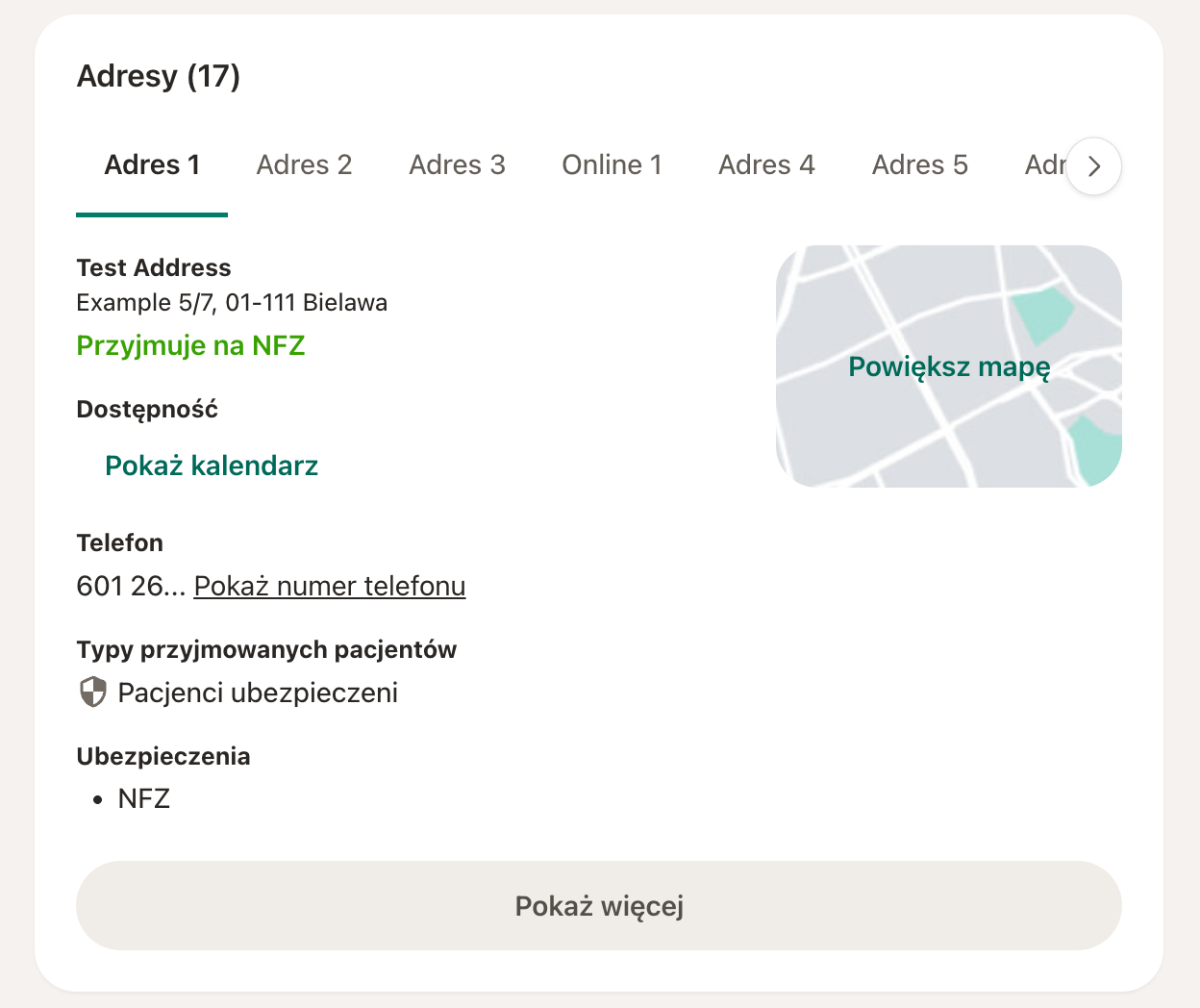
After linking, the address shows the Przyjmuje na NFZ label on the doctor profile:
Feeding NFZ slots
NFZ availability is created through the same replaceSlots endpoint you already use for private slots. The differentiator is the per-work-period insurance metadata:
insurance_accepted—"with-insurance-only","with-and-without-insurance", or"without-insurance-only"(the latter is also the default when omitted).insurance_providers— array of provider ids. For NFZ this is[13].
Insurance config applies to every service in a work period
Each element of the slots[] array is one work period with a single start/end and a list of address_services. The insurance_accepted and insurance_providers you set on that work period apply to all services listed inside it. To use different insurance rules for different services, place them in separate work periods.
A pure NFZ block:
{
  "slots": [
    {
      "address_services": [
        { "address_service_id": "111", "duration": 30 },
        { "address_service_id": "112", "duration": 15 }
      ],
      "start": "2026-06-01T08:00:00+02:00",
      "end":   "2026-06-01T12:00:00+02:00",
      "insurance_accepted": "with-insurance-only",
      "insurance_providers": [13]
    }
  ]
}
Private and NFZ in the same request — send them as separate work periods, even on the same day:
{
  "slots": [
    {
      "address_services": [
        { "address_service_id": "111", "duration": 30 },
        { "address_service_id": "112", "duration": 15 }
      ],
      "start": "2026-06-01T08:00:00+02:00",
      "end":   "2026-06-01T12:00:00+02:00",
      "insurance_accepted": "with-insurance-only",
      "insurance_providers": [13]
    },
    {
      "address_services": [
        { "address_service_id": "111", "duration": 30 }
      ],
      "start": "2026-06-01T13:00:00+02:00",
      "end":   "2026-06-01T17:00:00+02:00",
      "insurance_accepted": "without-insurance-only"
    }
  ]
}
If a single period should be bookable as either NFZ or private, use "with-and-without-insurance" together with insurance_providers: [13]. NFZ visits are free for the patient, so on the address service both price: 0 and price: null are acceptable — pick whichever matches your existing convention.
Common 4xx responses on PUT /slots:
Insurance providers missing when with-insurance-only— you forgotinsurance_providers.Insurance providers not supported when without-insurance-only— drop the providers array.Insurance provider does not exist— the id is unknown for the marketplace.429 Too Many Requests— duplicate request for the same address/payload while the previous one is still processing.
NFZ on bookings
Booking from the clinic system
When the partner system books an NFZ visit, call bookSlot and include insurance_provider_id: "13". Do not send insurance_plan_id.
POST https://www.{domain}/api/v3/integration/facilities/{facility_id}/doctors/{doctor_id}/addresses/{address_id}/slots/{start}/book
{
  "address_service_id": "111",
  "duration": 30,
  "is_returning": false,
  "insurance_provider_id": "13",
  "patient": {
    "name": "Anna",
    "surname": "Kowalska",
    "email": "anna.kowalska@example.com",
    "phone": "+48123123123"
  }
}
Reading insurance on existing bookings
getBookings and getBooking include an insurance object on each booking. Detect NFZ via insurance.id === "13":
{
  "id": "2134124",
  "status": "booked",
  "start_at": "2026-06-01T09:00:00+02:00",
  "end_at":   "2026-06-01T09:30:00+02:00",
  "duration": 30,
  "patient": { "name": "Anna", "surname": "Kowalska" },
  "insurance": {
    "id": "13",
    "name": "NFZ",
    "plan": null,
    "plan_id": null
  }
}
Bookings created by patients on Docplanner
Once NFZ is enabled for your integration, the existing booking callbacks (slot-booking, slot-booked, booking-moved, booking-canceled) are enriched with an insurance object inside visit_booking / visit_booking_request. Read it directly from the payload to identify NFZ bookings — there is no need to re-fetch the booking via GET just to determine the insurance provider. Coordinate enablement with the Docplanner team before relying on the enriched payload in production.
{
  "name": "slot-booked",
  "data": {
    "facility": { "id": "1", "name": "Sample hospital" },
    "doctor":   { "id": "123", "name": "Anna", "surname": "Lekarz" },
    "address":  { "id": "111", "name": "Example clinic" },
    "visit_booking": {
      "id": "6263715",
      "status": "booked",
      "insurance": { "id": "13", "name": "NFZ", "plan": null, "plan_id": null }
    }
  },
  "created_at": "2026-06-01T08:38:32+02:00"
}
For private bookings the insurance object is null; for NFZ bookings insurance.id === "13".
Moving, cancelling, filtering
The insurance on a booking is fixed at creation. moveBooking preserves it — moving to a new time, service, or address does not change insurance.id. To switch a patient between private and NFZ, cancel the booking and create a new one on a slot with the desired insurance configuration.
There is no insurance_provider_id filter on GET /slots or GET /bookings. Filter on the partner side: inspect insurance.id per item from GET /bookings, and keep your own NFZ-vs-private flag for slots based on what you submitted to replaceSlots (GET /slots does not echo the insurance metadata back).
Marketplace presentation
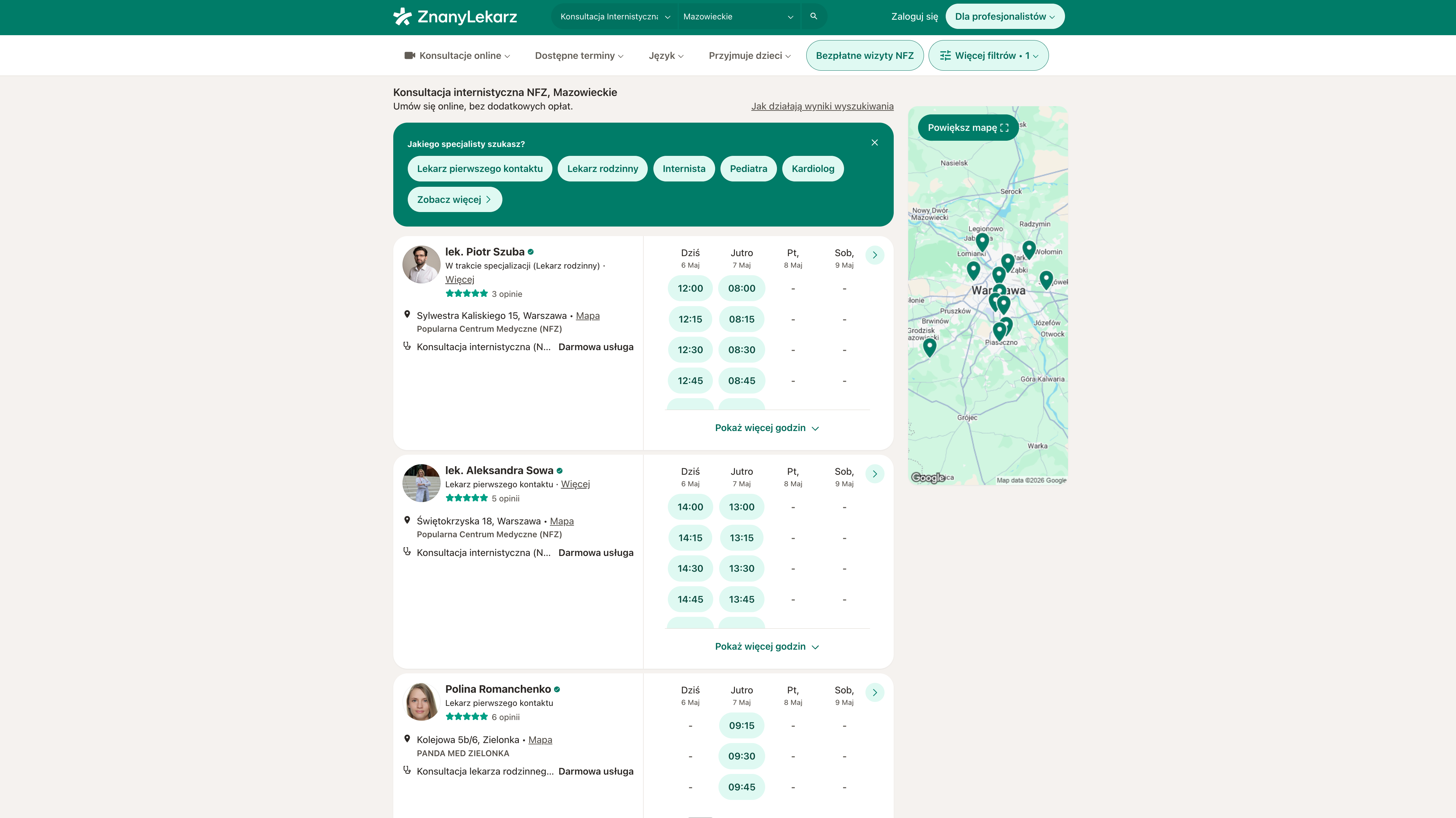
On znanylekarz.pl, NFZ availability is exposed to patients alongside private slots once the steps above are in place. Patients see a dedicated NFZ filter and badge on doctor profiles and search listings, and the booking flow does not ask the patient for additional NFZ-specific data — no PESEL or insurance card prompts at the API layer. UI details may evolve, so treat them as informational; the contract between partner and Docplanner remains the API behaviour described above.
Testing
NFZ flows can be exercised in your regular partner test suite. NFZ enablement is a Docplanner-side configuration, so coordinate test-environment setup with the Docplanner team before running end-to-end NFZ scenarios.
Implementation checklist
- Verify
insurance_provider_idfor NFZ is13onznanylekarz.pl(one-time lookup viaGET /insurance-providers). - For each NFZ-eligible address, ensure
insurance_provider_id: "13"is linked viaPOST .../insurance-providers. - In
replaceSlots, sendinsurance_acceptedandinsurance_providers: [13]on NFZ work periods. Keep private periods either with"without-insurance-only"or with no insurance fields. - On outgoing
bookSlot, includeinsurance_provider_id: "13"for NFZ visits. Do not sendinsurance_plan_id. - On incoming bookings (both
GETand callback notifications), read theinsuranceobject directly from the payload and treatinsurance.id === "13"as NFZ. - Coordinate activation and test-environment setup with the Docplanner team.